Preview guide:
send a SketchUp model to FOCO.
How to install the FOCO Workshop Cut Lists preview, give each panel the exact board you want, and send the lot to our cut list. Written for the preview build of 10 November 2026.
Built on OpenCutList. If you already use it, you already know how to use this: the same window, the same tabs, the same Generate button, with our boards built in. See what’s the same and what’s new.
The short version
- Install the preview. It is OpenCutList with our boards built in.
- Paint each panel with a material that starts with FOCO.
- Open the Parts List and press Generate.
- Send the cut list to FOCO.
- Check it on the website, then order.
1Already use OpenCutList?
Then you already know how to use this. FOCO Workshop Cut Lists is built on OpenCutList 7.1.0, the free SketchUp extension by L’Air du Bois, with our boards built in. It looks and works like OpenCutList: the same window, the same tabs, the same Generate button. We added the part that connects it to FOCO.
Exactly as in OpenCutList
- The window and its tabs: Materials, Parts List, Outliner and Import Parts, plus the OpenCutList Tools toolbar.
- Generate builds the Parts List, with a group for each material, sizes, quantities and cutting diagrams.
- Edge banding is set up and painted the same way, as an Edge Banding material.
- Your panels are groups or components drawn at their real thickness, with the names you give them.
What FOCO adds
- Our boards as materials. Every board and thickness we cut is already in your model’s Materials, named FOCO …, with a swatch.
- Painting links the board. Paint a panel with a FOCO material and it is tied to that exact board on our website.
- Send generated cut list to FOCO. One menu item opens our cut list with your parts already loaded.
- A searchable board catalogue (Assign FOCO board to selection), and a way to take panels out (Exclude selection).
Two things that are different
- Use only FOCO materials for boards. In OpenCutList any material can be a board. Here only materials whose name starts with FOCO link to our website, and a panel in any other material is left out. Edge banding is the one exception.
- It replaces OpenCutList. It uses OpenCutList’s own extension name inside SketchUp, so you can’t have both installed. You can uninstall it and put OpenCutList back whenever you like.
New to OpenCutList? You don’t need to learn it first. The rest of this guide covers everything you need.
2Before you start
- SketchUp 2017 or newer, on Windows or Mac. SketchUp for Web can’t run extensions, so use the spreadsheet route on the SketchUp page instead.
- An internet connection. The extension reads our live board list when you assign boards, generate the Parts List and send.
- Panels drawn as groups or components, at their real thickness. The next sections explain how.
3Install the preview
It takes a couple of minutes and you only do it once. The steps are the same on Windows and Mac.
- Download the file. Press Download the preview on focoworkshop.co.uk/sketchup, or at the top of this page. You get one file, foco-cutlists-preview.rbz (about 12 MB), normally in your Downloads folder. Keep it as an .rbz file; don’t unzip it.
- Open SketchUp, then .
- Press Install Extension and choose the .rbz file.
- SketchUp may warn that the extension isn’t from a signed developer. This preview isn’t signed, so choose to allow it. If SketchUp won’t install it, open the settings (cog) button in Extension Manager and set the loading policy to allow unidentified extensions. The wording differs between SketchUp versions.
- Restart SketchUp if it asks. The Extensions menu now has FOCO Workshop Cut Lists. If you used OpenCutList before, this replaces its menu entry. The small OpenCutList – Tools toolbar is part of OpenCutList and is still there.
- Open or create a model and give it a few seconds. The extension adds all of our boards to the model’s Materials, one for each board and thickness, each with a swatch. It needs an internet connection to fetch our board list, and it only adds boards the model doesn’t have yet, so reopening a model is quick.
- Check it worked. Open . You should see boards named like FOCO U961-PM Graphite Grey 18mm. If the list is empty, press the red Refresh button at the top right of the tab.
If your browser unzips the download or saves it with a .zip ending (Safari can), change the ending back to .rbz, or turn off Open “safe” files after downloading in Safari → Settings → General and download it again.
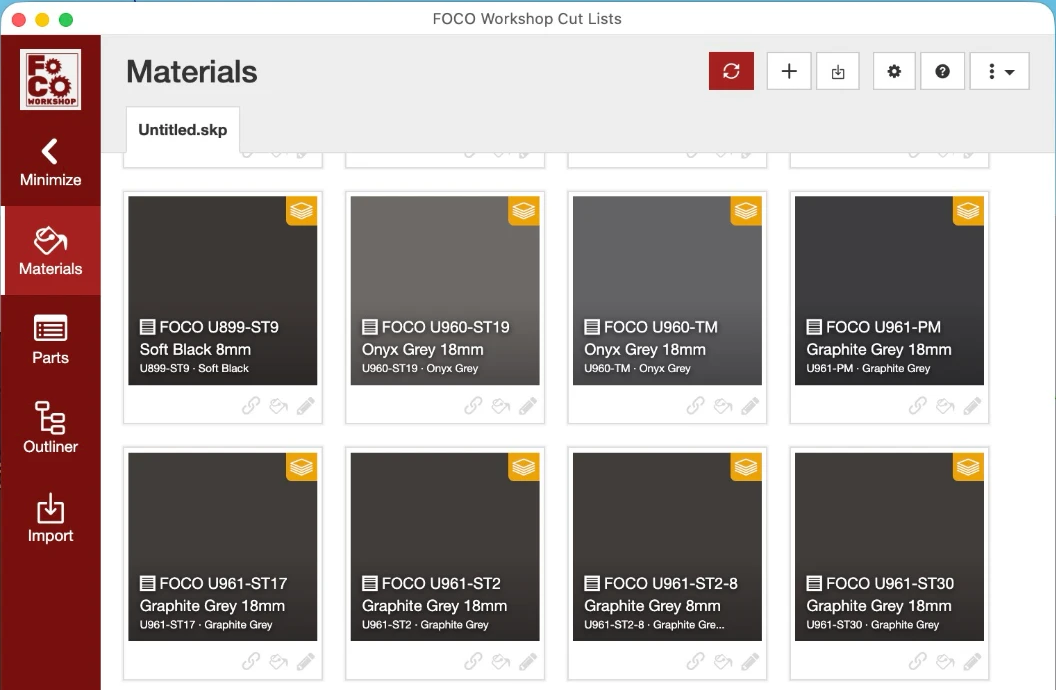
Where the FOCO boards appear
- In the extension’s Materials tab (shown above). This is the easiest place to see them and pick the right thickness.
- In SketchUp’s own Materials window. Press B for the Paint Bucket and it opens. It starts on SketchUp’s built-in library, with folders such as Asphalt, Brick and Fabric, and our boards are not in there. Press the In Model button (the house icon) to see the boards in your model, all starting with FOCO.
What’s in the menu
The menu has four FOCO items, then OpenCutList’s own tabs:
- Assign FOCO board to selection: pick a board from a catalogue with search, and paint the selected panels with it.
- Exclude selection from FOCO cut list: take panels out of the cut list.
- Send generated cut list to FOCO: send the Parts List to our website.
- Open FOCO board catalogue: browse our boards on the website.
- Materials, Parts List, Outliner and Import Parts: OpenCutList’s tabs. Materials lists our boards and the edge banding; Parts List makes the cut list.
To update, install a newer .rbz the same way; it replaces this one. To remove it, open Extension Manager, find FOCO Workshop Cut Lists (OpenCutList fork) and uninstall it. You can then install OpenCutList again from the SketchUp Extension Warehouse.
4Prepare your model
- One panel is one group or one component. You can paint each panel, or paint the cabinet that holds them and its boards take the finish. A group that contains other groups or components is never sent as a single panel.
- Draw each panel at its real thickness. The thinnest side is the thickness, and it must match the board you pick, to 0.1mm. An 18mm board needs an 18mm panel. For an 8mm back, pick the 8 mm board.
- Use plain rectangles. Sizes come from each panel’s overall dimensions, so notches, curves and cut-outs aren’t included. Our cut list cuts rectangles.
- Name your panels. The name (the instance name, otherwise the component name) becomes the description on the cut list: “Left side”, “Shelf”, “Back”.
- Only panels painted with a FOCO board are sent. Leave walls, worktops, appliances and handles in any other material and they are ignored. Nothing else needs deleting.
- Grain runs along the Length on our cut list. Check each part’s Length and Width on the website. If the grain should run across a panel’s longest side, swap the two measurements there.
- Veneers and panels made of stacked layers aren’t accepted. Each panel should be one plain board.
5Paint each panel with a FOCO board
Painting is how a panel is linked to a board on our website. Every FOCO board and thickness is its own material, so pick the thickness that matches your panel: 8mm Lissa Oak and 18mm Lissa Oak are different materials.
- Open . Our boards are listed there as FOCO materials with their swatches, named like FOCO H1154-ST7-8 Lissa Oak 8mm. The thickness is at the end of the name, so check it matches your panel.
- Select the panels (or the cabinet that holds them) and paint them with the board. Use the paint bucket on the material’s card, or choose the material in SketchUp’s Materials window (press the In Model house button first) and use the Paint Bucket.
- Repeat for each board and thickness in your model.
When you generate the Parts List, SketchUp lists any board-like panels that aren’t painted with a FOCO board, so nothing goes missing without you knowing.
Prefer to search? Use Assign
Select panels and choose . The Board catalogue opens with swatches and a search box. Click the thickness you need on the board’s card and press Assign to selection. This paints the panels with the same FOCO material.
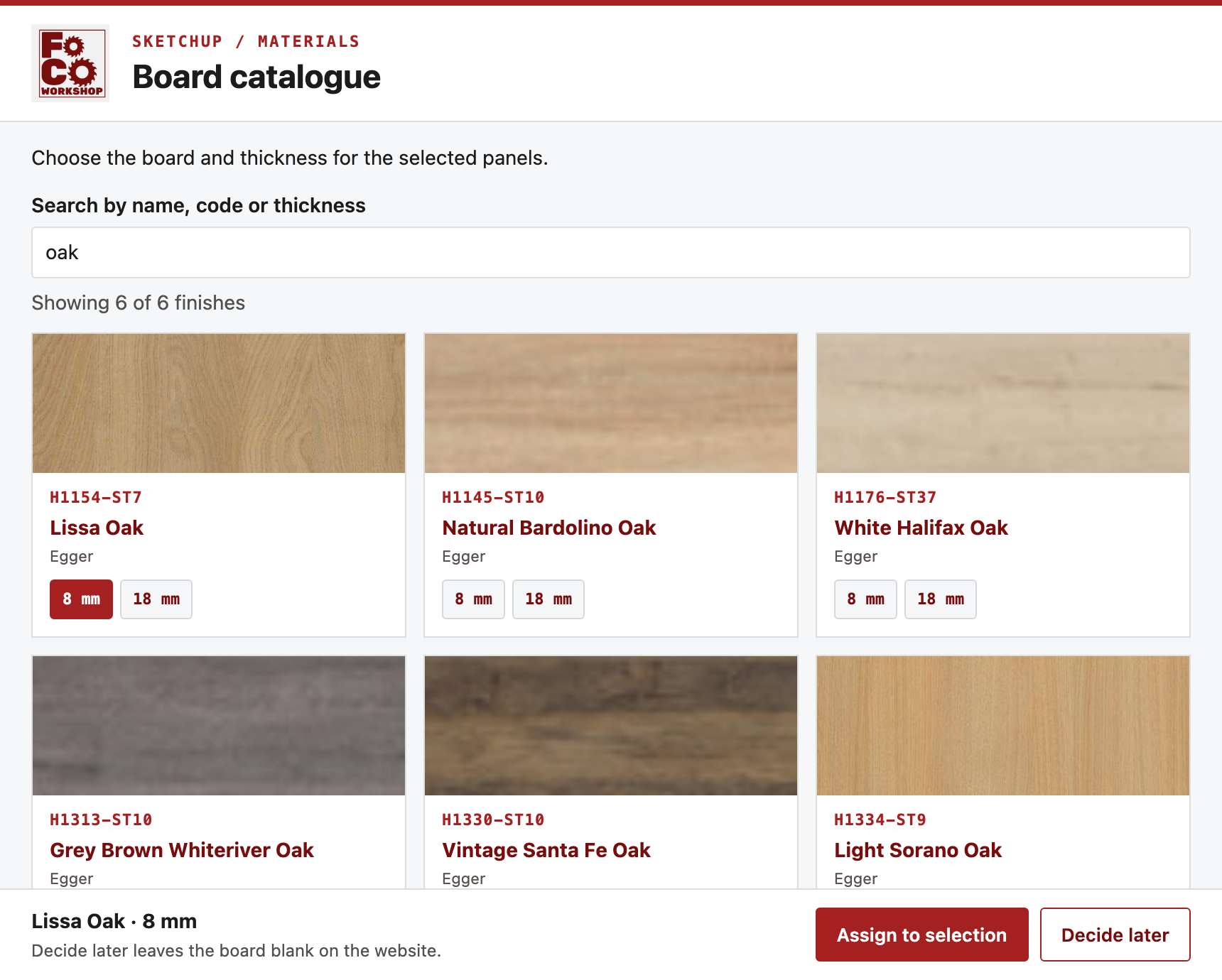
Not sure yet? Decide later
In the Board catalogue, press Decide later instead of Assign. Those panels are still sent, with their sizes and quantities, but with no board. You pick the board on the website. A panel needs a board before you can see its cutting diagram or check out.
Changing your mind
- Paint the panels again with a different FOCO board. The new one replaces the old.
- takes the panels out of the cut list but keeps their finish in the model.
- Locked groups can’t be assigned with the catalogue. Unlock them first. Loose faces can’t be painted as a panel; make them a group or component.
6Edge banding
Edge banding comes from OpenCutList’s edge materials, exactly as in OpenCutList. Set it up once, then paint the edges you want banded. It is the one kind of material that doesn’t start with FOCO: it isn’t a board, it only tells us which sides to band and how thick the tape is.
- Open . Create a material, or edit one in your model, set its Type to Edge Banding and its Thickness to 1mm or 2mm. The names in OpenCutList’s tabs may differ slightly with your SketchUp language.
- With SketchUp’s Paint Bucket, paint that material on the narrow edge faces you want banded.
- Send as normal. The edging goes across as L1 and L2 (the two long sides) and W1 and W2 (the two short ends), the same as our cut list.
- Every banded side of a panel must use the same thickness, 1mm or 2mm. FOCO uses tape that matches the board.
- Edging stays a property of the panel. It doesn’t add a line to the cut list.
- Always check the edging on the website before you pay: look that the sides shown as banded are the ones you meant.
7Generate the Parts List
- Open and press Generate.
- The list shows one group for each FOCO board, with its panels, sizes and quantities. Only panels painted with a FOCO board appear.
- Check the sizes, thicknesses and quantities. If SketchUp says No FOCO panels found, paint the panels you want cut with a FOCO board first.
- If SketchUp lists panels that aren’t painted with a FOCO board, they were left out. Paint them with a FOCO board and generate again, or ignore the message for things you don’t want cut.
- You can open a cutting diagram for a board. It uses a full FOCO sheet (for example 2800 × 2070mm). Offcut sizes you enter in OpenCutList are ignored.
- A panel marked Decide later has no sheet yet, so it has no diagram or estimate until you choose a board.
- Generate again whenever you change the model or the boards. The extension asks you to if the list is out of date.
8Send it to FOCO
- Choose .
- The extension checks every panel against our live board list, then asks: “Send the N part rows in this cut list to FOCO Workshop for pricing?” It adds a line if some rows have no board yet, or if there is edging to check.
- Press OK. Your web browser opens the FOCO cut list with your parts loaded.
The link our site opens is kept for 24 hours. To start again, send again. Sending doesn’t need an account and costs nothing; you only pay when you order.
9On the website
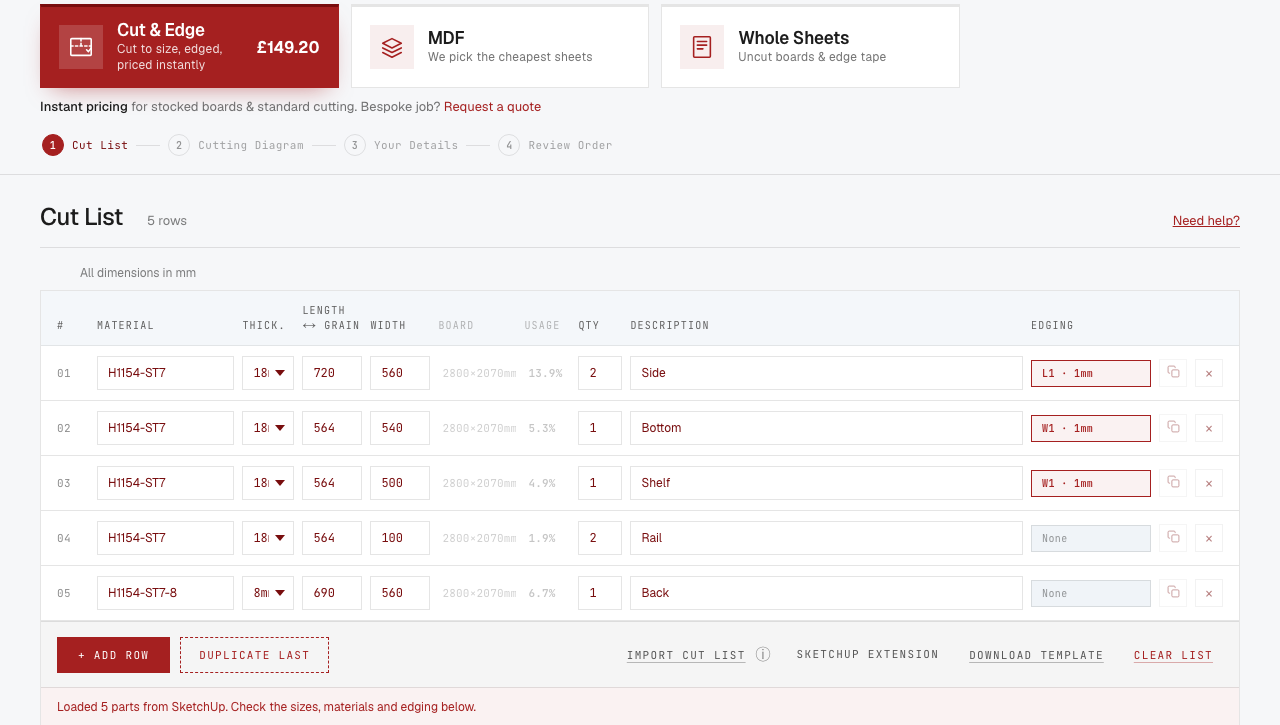
- Your parts appear in Cut & Edge, on the boards you chose, with thickness, sizes, quantities, names and edging. Opening the link replaces any parts already in that list.
- Plain MDF goes to the MDF section, where we pick the cheapest sheets. It takes one MDF product per send.
- Panels marked Decide later bring up a Match your materials box, listed as No material set. Type the board code or name you want. The part keeps its thickness: an 8mm part matched to a decor that comes in 8mm goes on the 8mm board.
- A board with no online price shows Price on request. They’re left out of your total and your payment, and saved to your quotes as not ordered. We send you a price.
- Check everything, especially sizes, quantities and which sides are banded (L1/L2 long sides, W1/W2 short ends), and fix anything in the list. Then continue to the cutting diagram, enter your details and pay.
10If something goes wrong
I can’t see the FOCO boards
- Give it a few seconds after opening or creating a model. The boards are added then.
- Check your internet connection. The extension fetches our board list to add them.
- Open and press the red Refresh button at the top right.
- Looking in SketchUp’s own Materials window? Press the In Model (house) button. The window starts on SketchUp’s built-in library, which doesn’t have our boards.
- Still nothing? Open and look for a line that begins FOCO Workshop: boards not added to Materials yet. The reason follows in brackets. Send it to us (see Help, below).
A panel is missing from the Parts List
- Is it painted with a material whose name starts with FOCO? A panel in any other material is left out.
- Is it a group or component, not loose faces, and unlocked?
- Did you press Generate again after painting it? The Parts List doesn’t change until you do.
Messages you may see
SketchUp shows a message box and nothing is sent. This table lists the messages you may see.
| The message | What it means | What to do |
|---|---|---|
Select the panel groups or components you want to assign first. | Nothing is selected, or what you selected isn’t a group or component. | Select your panels (they must be groups or components, and unlocked) and try again. |
Could not reach FOCO Workshop or read its response. Check your connection and try again. | SketchUp couldn’t get our board list or send your cut list. | Check your internet connection and try again. On a work network, ask your IT team to allow focoworkshop.co.uk. |
No FOCO panels found. Paint the panels you want to cut with a FOCO board from the Materials tab (or use Assign FOCO board to selection). | Generate found no panels painted with a FOCO board. | Paint your panels with a FOCO board, then press Generate again. |
… board-like panels aren’t painted with a FOCO board, so they were left out of the cut list: … | Those panels are in a material that doesn’t start with FOCO, so it doesn’t link to a board on our website. | Paint them with a FOCO board from the Materials tab and generate again. Ignore it for panels you don’t want cut. |
Assign an available FOCO board of the matching thickness to: … | A panel isn’t the same thickness as the board it has. | Check the panel’s thickness in your model (it must match the board to 0.1mm), or assign the board in the thickness you drew. |
Reassign the FOCO board for … Its material changed or the board is no longer available. | The panel was repainted after you assigned a board, or we no longer sell that board. | Paint the panel with a FOCO board again. |
Board assignments changed. Generate the cut list again before exporting. Generate a current cut list before sending it to FOCO. | You changed the model or the boards after generating the Parts List. | Open the Parts List and press Generate again, then send. |
… uses veneers or stacked layers. Send individual unveneered boards. | The panel has more than one layer, or different finishes on its faces. | Use a single plain board for each panel. |
… needs one FOCO tape thickness (1 mm or 2 mm) on all edged sides. | The edged sides of a panel use different thicknesses, or a thickness other than 1mm or 2mm. | Use one Edge Banding material, 1mm or 2mm thick, on all edged sides of the panel. |
FOCO does not offer edgebanding for … (…). | We can’t band that board. | Choose a different board, or remove the edge banding from that panel. |
The cut list has no panels to send. | The Parts List is empty. | Assign boards, then press Generate in the Parts List. |
The selection changed. Reopen the FOCO board catalogue for the current selection. | You changed the selection while the catalogue was open. | Close the catalogue, select your panels again and reopen it. |
“…” is 8mm thick but H1154-ST7 is 18mm — assign the 8mm board, or fix the part’s thickness. | Our website checked the panel against the board and the thickness doesn’t match. | Assign the board in the right thickness (the picker shows each thickness as its own button). |
“…”: its FOCO board is no longer in the catalogue — assign the board again in SketchUp. | The board was withdrawn or changed since you assigned it. | Assign a board again, generate and send. |
This model uses more than one MDF product (…). Send one MDF product at a time. | The MDF section prices one MDF product per cut list. | Send one MDF product, then do the other separately. |
The FOCO board catalogue is unavailable right now — please try again in a minute. | Our board list couldn’t be read for a moment. | Wait a minute and send again. |
Too many different parts (limit 500). / That model is too large to send. / Too many requests — please try again in a few minutes. | You hit a size or rate limit. | Send fewer parts at once (select part of the model), or wait a few minutes. |
This link has expired. Send the model from SketchUp again. | The link our site opens is only kept for 24 hours. | Send the cut list from SketchUp again. |
An error window that asks you to email opencutlist@lairdubois.fr | OpenCutList’s own error window. This is our modified build, so the original author can’t help with it. | Email sales@focoworkshop.co.uk instead, with the error text. |
11What the preview doesn’t do yet
- Solid boxes aren’t turned into cabinets. The standard FOCO extension does that. The preview sends individual panels only.
- One tape thickness per part, 1mm or 2mm, and no veneers or stacked layers.
- Full sheets only. Cutting diagrams use whole FOCO sheets and ignore offcut sizes.
- One MDF product per send.
- Your model gets about 570 board materials. SketchUp’s Purge Unused removes the ones you don’t use; they come back the next time you open the model.
- Paint the whole panel (or its cabinet). Painting only some faces of a panel isn’t read.
- It isn’t signed, so SketchUp may ask you to allow it.
- It’s a preview. Check your cut list on the website before you pay.
12Help, and about this build
Call the workshop on 0151 739 8719 (Monday to Friday, 08:00 to 17:00), email sales@focoworkshop.co.uk, or use the contact form at focoworkshop.co.uk/contact. If you can, include the text of any message you saw and a screenshot.
FOCO Workshop Cut Lists is a preview build (10 November 2026) of OpenCutList 7.1.0 by L’Air du Bois (lairdubois.fr), licensed under the GNU General Public License v3. FOCO Workshop made the changes listed in FOCO-BUILD.md inside the download, which also contains the modified source. The original source is at github.com/lairdubois/lairdubois-opencutlist-sketchup-extension (version 7.1.0). The FOCO Workshop name and logo are separate brand assets.